Runs fully local · one docker compose up

Personal knowledge engine

Your saves, finally worth something.

Weft pulls everything you save across X, Reddit, YouTube, Instagram, LinkedIn, Substack and Medium into one private library, searchable by meaning, answered with citations, and entirely yours.

The demo is the real app on a sample library. No signup, nothing installed, and it keeps working with your network off. Or install it now.

Runs fully local Zero API keys No passwords stored
Try asking "What have I saved about hiring?" → an answer with citations to the exact posts
localhost:5173 · your library
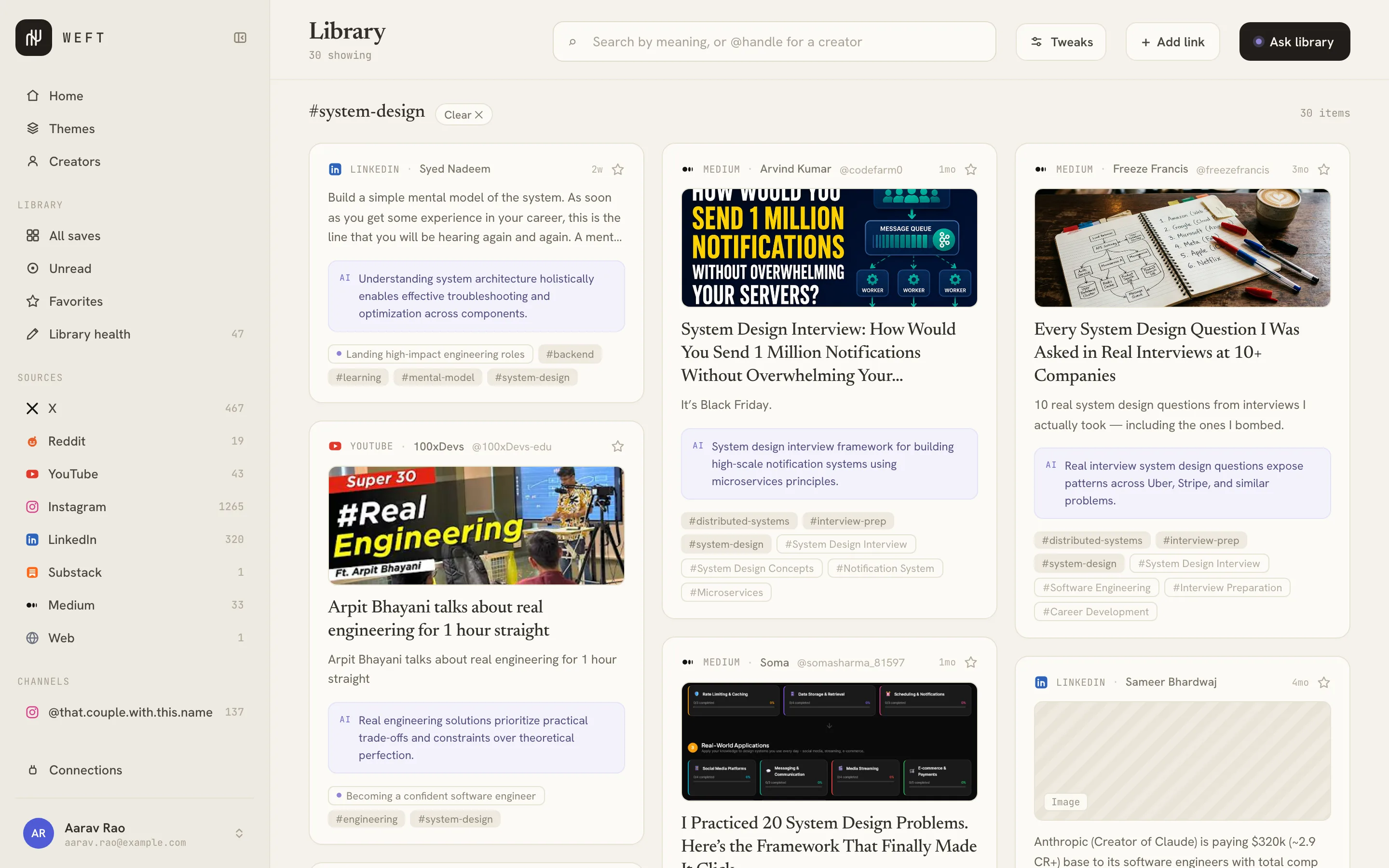
The Weft library filtered to the #system-design tag: saved posts from LinkedIn, Medium and YouTube on distributed systems and system-design interviews, each card carrying a one-line AI summary and its tags.

Captures from your own authenticated sessions

X Reddit YouTube Instagram LinkedIn Substack Medium Web

The shift

Bookmarks are where saved things go to die. Weft quietly collects what you save, from inside the browser you're already signed into, and turns the pile into a library you can search, ask, and actually think with.

Capture · the Chrome extension

Saved from inside your own browser.

A small Chrome extension does the saving. It reads the data each app already loaded in your own tab and sends just your saved items to Weft. Your password and cookies never leave the browser.

Weft Capture · Chrome extension
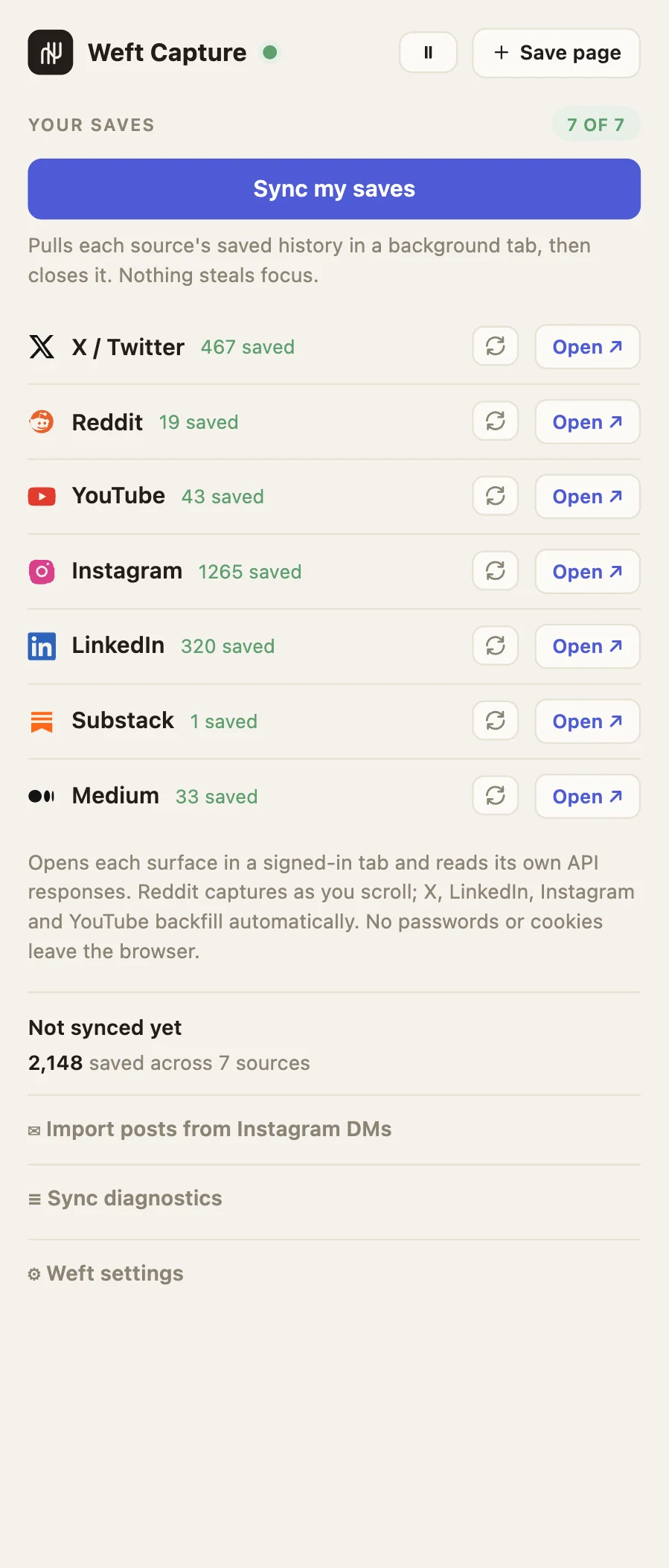
The Weft Capture extension popup: a 'Save this page' button showing 'Saved to Weft', the Weft API and token fields, a Save button, and live capture stats: 1,091 captured, 1,091 posted, 213 duplicate, 0 errors.

Nothing is scraped, and no crawler ever visits the site. The extension reads the data the app already fetched for you and hands your saved items to Weft in the background. It's a plain Chrome extension. No build step, no account. (The technical flow is below.)

  • No passwords or cookies ever leave your machine
  • Imports your whole saved history, not just new saves
  • Safe to re-run: saving the same thing twice is quietly ignored

Reads your own saved surfaces

X bookmarks Reddit saved LinkedIn saved posts Instagram Saved YouTube Watch Later
Add to Chrome Free · works in Edge & Brave too
How to install
  1. Unzip the download.
  2. Open chrome://extensions, turn on Developer mode.
  3. Click Load unpacked, pick the folder.
  4. Paste your token from Account settings.

Not on the Chrome Web Store yet, so it installs unpacked. That also means you can read every line before running it, which for something that sits inside your logged-in sessions is rather the point.

page · interceptorhooks fetch/XHR, reads API JSON
content scriptbridges page to worker
background workerbatches + dedupes
POST /v1/ingestvalidated · deduped
no passwords no cookies sent no server-side scraping

Ask your library

Ask in plain language. Get answers that cite the exact posts.

Ask a question in plain English and Weft searches everything you've saved, then answers with citations back to the exact posts, so you can trust it and click straight through to the source.

  • Finds answers by meaning, not just keyword matches
  • Honest when nothing matches: it won't invent a source
Ask your library
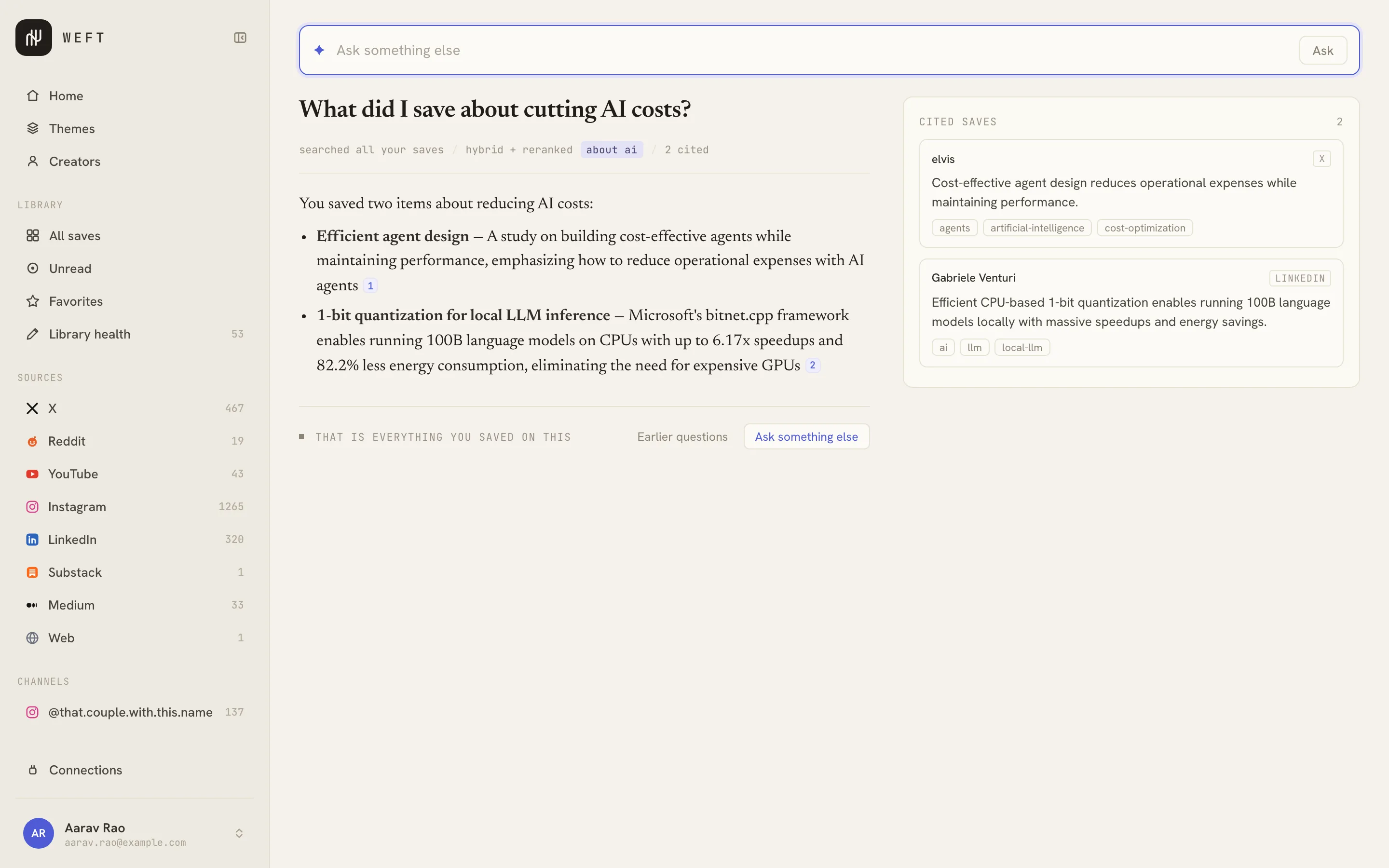
Weft's Ask panel answering 'What did I save about cutting AI costs?' with a four-point answer, numbered inline citations, and a Cited saves panel listing the exact posts each point came from.

In context · what nobody else does

Act on a save through your whole library, not the text alone.

Other tools act on one bookmark at a time. Weft reads a save against everything related to it in your library (the theme it belongs to, what you saved before and after) and does something useful with that context.

  • Connect the dots. Where a save fits: its theme, what led here, what built on it
  • Second opinions. Saves in your own library that complicate or contradict it
  • Catch me up. What you've saved on this since, and how your thinking moved
  • Turn into a post. A draft grounded in this save plus the related ones
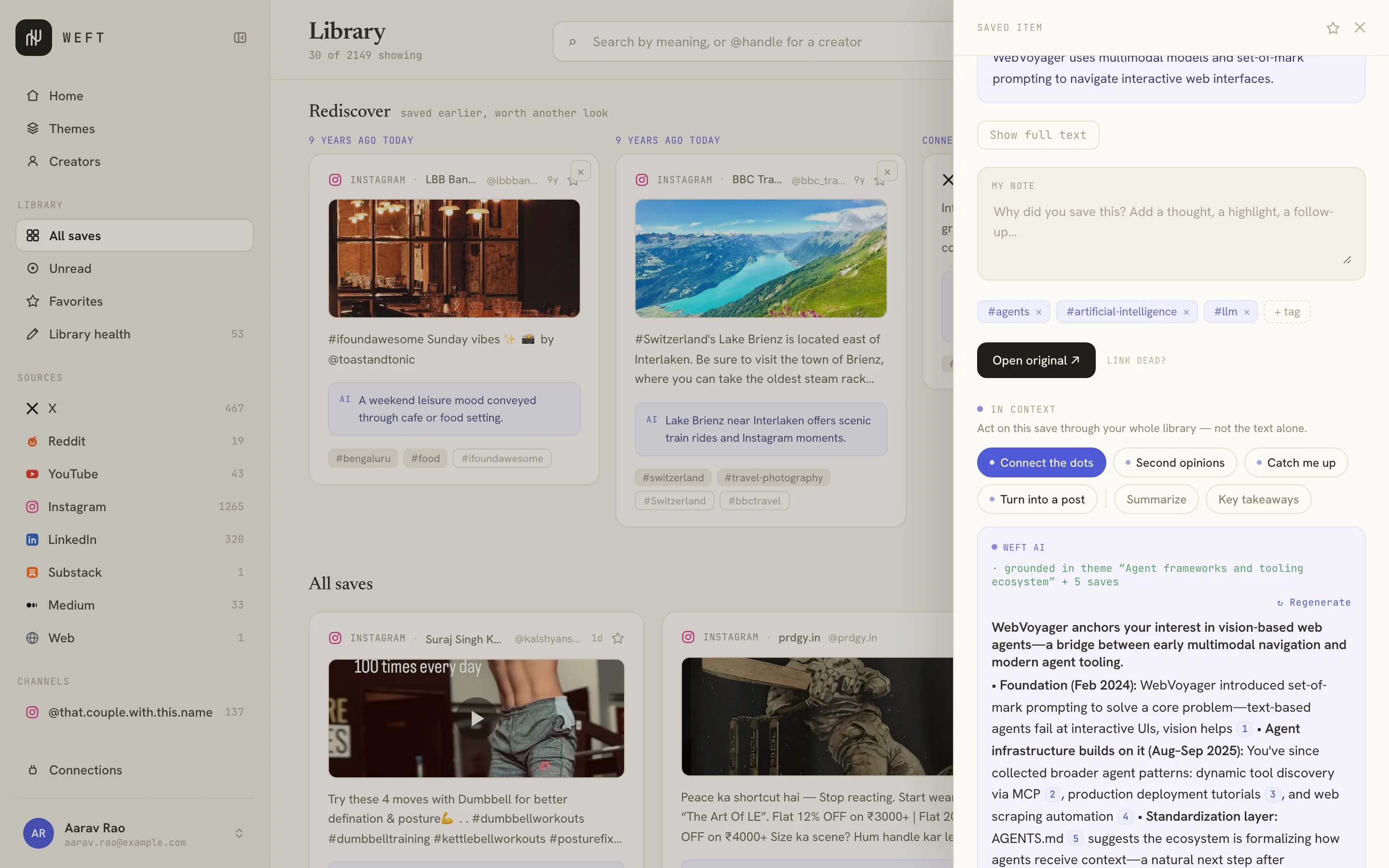
Connect the dots
A saved item drawer with the 'In context' actions open. 'Connect the dots' is selected and Weft has written an answer grounded in 6 saves from the library, with numbered citations, explaining how this save builds on earlier learning and responds to a later problem.

Themes

The through-lines you'd never connect yourself.

Weft groups what you save by meaning, across platforms and tags, giving each theme a human title and a one-line synthesis of what ties it together.

  • Groups that span X, LinkedIn, YouTube and Reddit at once
  • "Yes, that's exactly what I've been thinking about."
Themes
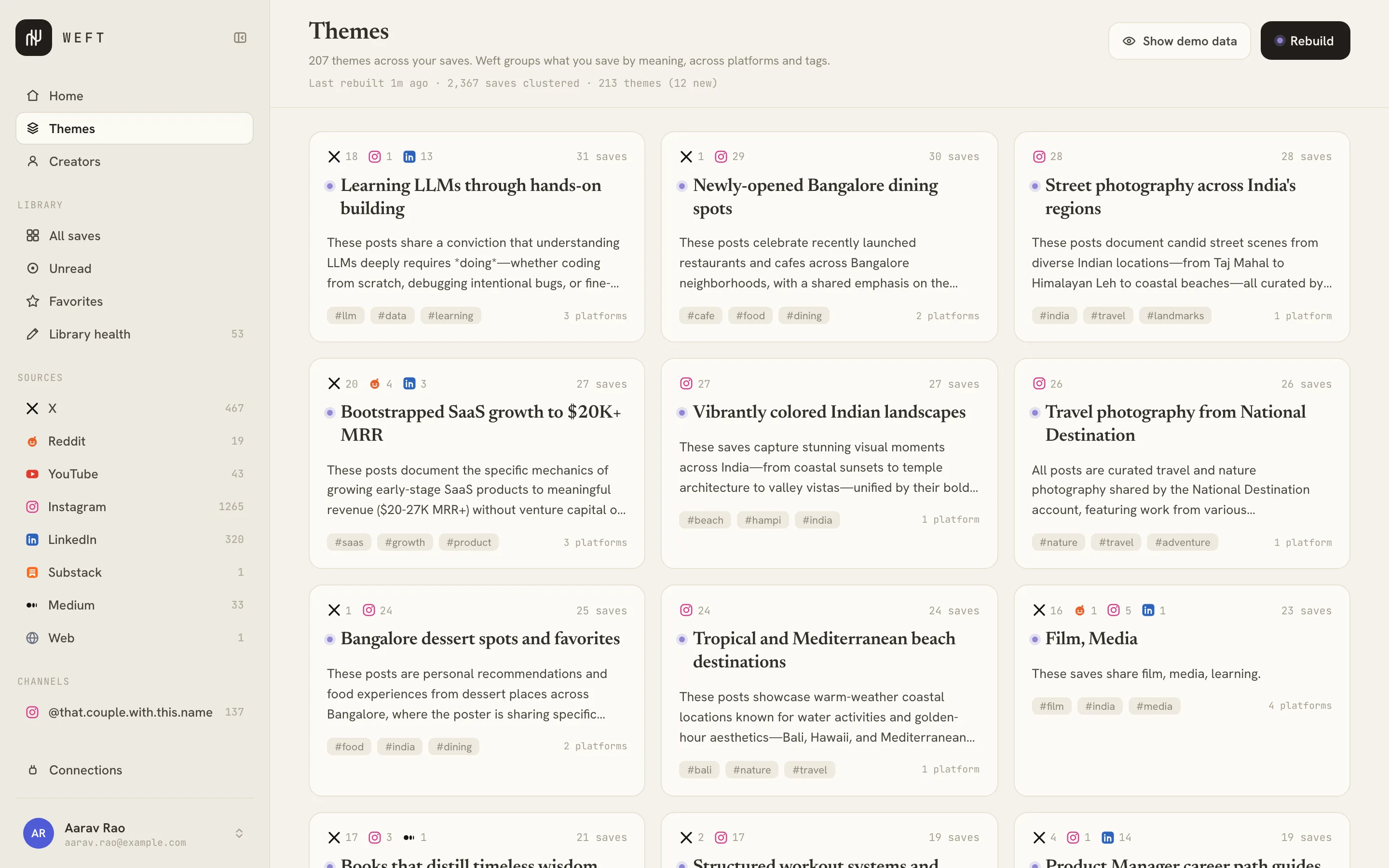
The Themes view: emergent themes across the library, each a card with a serif title like 'Learning LLMs through hands-on building' and 'Bootstrapped SaaS growth to $20K+ MRR', a synthesis naming what the saves have in common, their tags, and how many platforms the theme spans.

Rediscover

Your best saves, resurfaced.

We save things and never come back to them. Weft resurfaces a forgotten save at the right moment, so the pile you built actually pays off.

One year ago today
"If you want to become good at Kubernetes troubleshooting, learn these failure modes first…"
LinkedIn · saved 1y ago · never opened

MCP server

Use your library from Claude.

Connect Weft to Claude Desktop or Claude Code and ask about your library right inside the chat: search, ask, and browse your saves with cited answers. Local, no cloud account.

claude › what have I saved on retrieval? → calling weft_search("retrieval systems") → calling weft_connect(item) Found 8 saves across X, Reddit & YouTube, cited below.

How Weft connects

Weft never logs into your accounts. The session agent drives a browser you're already signed into and captures each platform's own API responses, not its HTML. No stored passwords, no proxy network, no server-side scraping.

Your session, not ours

The agent only sees a page you already have open. Nothing is proxied through a server.

Local by default, not local-only

fastembed + Ollama run on your machine with zero API keys. Prefer Claude, GPT or Gemini? Bring your own key, per capability.

Yours to delete

One Postgres database on your disk. Every read, write and ask is scoped to you and audit-logged.

What that means precisely

No telemetry, and none to turn off.
There is no analytics script on this page, in the app, or in the extension. No error reporting, no usage pings, no feature flags phoning home. The fonts on this page are served from this domain, not a CDN, so reading it tells nobody anything.
No account, in the sense that matters.
Nothing to sign up for, no email to verify, no server that knows you exist. Weft does have local profiles, with an optional PIN, so several people can share one machine without sharing a library. Those live in your own database and are checked by your own copy of the app.
Your saves are rows in a database you run.
There is no proprietary format to be trapped in and no export queue to wait on: it is Postgres, so pg_dump is the export, and docker compose down -v is the delete. Individual saves copy out as Markdown from the detail panel. There is no bulk import yet.
Passwords and cookies never reach the server.
The capture agent reads each platform's own API responses from inside a tab you are already signed into, and posts the resulting saves to your own machine. It never sends your session cookies anywhere, because there is nowhere to send them.
Don't take our word for it.
Open the demo, then open DevTools, Application, IndexedDB, and read weft-demo-v1 — that is the whole library, on your disk. Check the Network tab too: every request it makes is to this domain, and after the page has loaded there are none. Then turn your Wi-Fi off and keep using it. For the real thing, the code is on GitHub.

How it works

Three steps to a library that answers back.

1

Install the Chrome extension

Download it, load it unpacked, and paste your token once. It stays connected in the background.

2

Save as usual

Bookmark, like, and save across X, Reddit, YouTube, Instagram, LinkedIn, Substack and Medium. Weft ingests it in the background.

3

Ask & act

Search by meaning, ask cited questions, and act on any save through your whole library, from the app or from Claude.

FAQ

Questions, answered.

Does Weft need my passwords, or log into my accounts?

No. A Chrome extension runs in your own signed-in browser and reads the data each app already loaded for you. No passwords or cookies ever leave your machine, and there is no server-side login.

Where does my data live? Is it private?

On your machine. Everything runs locally in one database on your own disk, with no cloud account. Cloud AI is opt-in per feature, so by default nothing you save leaves your computer. Every read and question is scoped to you.

Which platforms can I save from?

X, Reddit, YouTube, Instagram, LinkedIn, Substack and Medium, plus any web page. Weft reads your X bookmarks, Reddit saved, LinkedIn saved posts, Instagram Saved, YouTube Watch Later, and the articles you save on Substack and Medium.

Do I need API keys, or does it cost anything to run?

No keys required, and nothing to pay for: Weft runs fully local by default, with the embedding and answering models on your own machine. If you would rather use a frontier model, bring your own key for Claude, GPT or Gemini. You choose it per capability, so you can leave tagging local and route only the answers to the cloud. The key is encrypted on your own machine and every call goes straight from your install to that provider. There is no Weft server in the middle, because there is no Weft server.

How is this different from bookmarks or a read-it-later app?

Those store links, and the pile just grows. Weft makes it usable: search by meaning, ask questions and get cited answers across everything, group saves into themes, and act on any single save through your whole library.

Can I use it with Claude?

Yes. An optional MCP server connects Weft to Claude Desktop and Claude Code, so you can search and ask your library right inside the chat.

One command. No keys.

Postgres, Redis, Ollama and the app: the whole system runs on a single command, on your machine.

$ ./install.sh docker compose up